

weareliferuiner

  • Home
  • TECH
    • APP
    • APP REVIEW
    • GADGETS
    • IOS
    • MAC
    • SMARTPHONE
  • COMMUNICATION
  • LIFESTYLE
    • BEAUTY
    • FAMILY
    • FESTIVAL
    • FITNESS
    • FOOD & DRINK
    • HEALTH
  • MONEY
  • Chocolate
  • PRODUCTIVITY
  • NEWS
  • Contact Us !
Reading: Google Maps for Android Now Supports Navigation to Multiple Destinations
Share
Aa
Aa
weareliferuinerweareliferuiner
Search
  • Home
  • TECH
    • APP
    • APP REVIEW
    • GADGETS
    • IOS
    • MAC
    • SMARTPHONE
  • COMMUNICATION
  • LIFESTYLE
    • BEAUTY
    • FAMILY
    • FESTIVAL
    • FITNESS
    • FOOD & DRINK
    • HEALTH
  • MONEY
  • Chocolate
  • PRODUCTIVITY
  • NEWS
  • Contact Us !
Have an existing account? Sign In
Follow US
© 2022 Foxiz News Network. Ruby Design Company. All Rights Reserved.
weareliferuiner > TECH > SMARTPHONE > Google Maps for Android Now Supports Navigation to Multiple Destinations
SMARTPHONE

Google Maps for Android Now Supports Navigation to Multiple Destinations

sristy
Last updated: 2016/07/27 at 2:26 AM
By sristy 3 Min Read
Share
SHARE

Google Maps for Android Now Supports Navigation to Multiple Destinations

HIGHLIGHTS

  • Users will have to install the latest 9.31 version of Maps app
  • The feature also requires server-side switch from Google
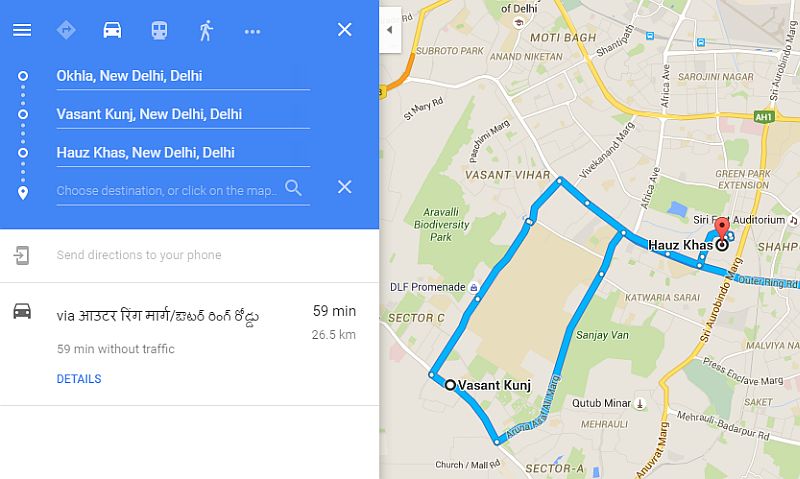
  • The new features helps users add multiple stops while navigating

Google Maps for Android was expected to bring the navigation to multiple destinations option back in April. The feature has however started rolling out to the Android users only now.

The feature requires users to install the latest version of the Google Maps for Android app. Android Police points out that the feature “is being activated via a server-side switch, not an actual update to the Maps app.” We can expect the feature to be available to users soon.

Users will be required to install or update the Maps for Android app to version 9.31. Notably, the version is steadily rolling out to the Google Play but doesn’t guarantee that multiple destination feature will work after the update.

Previously the Maps mobile app allowed users to side-track during a trip to gas stations, restaurants, cafes, and shopping marts. The app however didn’t allow users to navigate to multiple destinations, something that Google Maps allowed on desktop. Map’s multiple destination feature on Android app works same as the desktop and allows users to add multiple stops while navigating.

Until the new option shows up on your mobile app, you can take a little help from the desktop to navigate to multiple destinations using the Maps for Android. Users will have to copy the full URL of a multiple destination search on Maps for desktop, and send it to themselves on mobile in whichever way they please, from an email to a message to yourself in a chat app. Once users click on the received link and then choose to open it in Google Maps, the app will open the multiple destination route navigation. We’ve independently verified the method works, and don’t hesitate to say it can truly be a boon to users.

Win Star Trek merchandise and movie tickets by participating in our Star Trek Beyond contest.

Tags: Android, Google, Google Maps, iOS, Maps, Traffic Alerts
[“Source-Gadgets”]
TAGGED: 'Destinations', Android, for, Google, Maps, Multiple, Navigation, Now, Supports, to
sristy July 27, 2016
Previous Article Facebook Wins Privacy Case Against Belgian Data Protection Authority
Next Article Taxi Service Meru Raises Rs. 150 Crores in Funding

Latest News

Mindfulness for Moms: Simple Ways to Reset During a Busy Day
Chocolate
Behind the Process: How the Flavour MOT Works (And What You’ll Learn in Just a Week)
FOOD & DRINK
Leverage the In-App Review API for your Google Play reviews
APP REVIEW
Managing Obesity with Modern Tools: Lifestyle Changes, Medications, and Surgery
LIFESTYLE
How to Add a Blog to Your Bubble App Using a Subdirectory
APP
The Delicious Shade of Chocolate: Exploring Its True Color
Chocolate
How to Choose the Right 3 BHK Layout for Comfortable Living
LIFESTYLE
Cadbury Flake – Smooth, Crumbly & Truly Indulgent
Chocolate

Removed from reading list

Undo

Lost your password?