
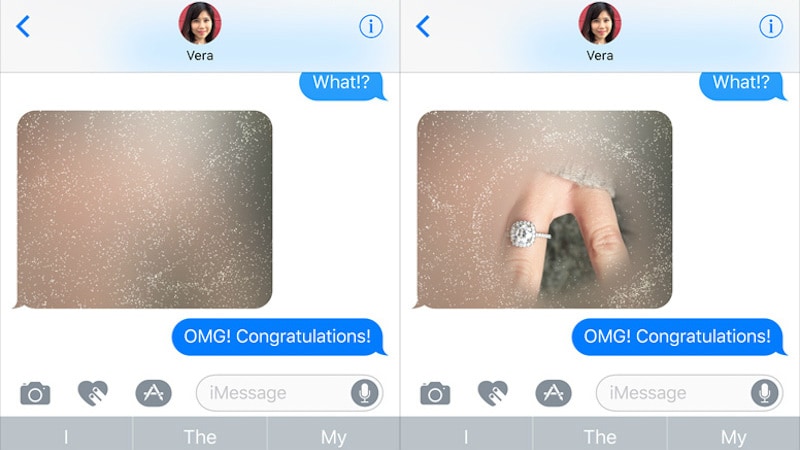
With iOS 10, Apple has added several effects to iMessage. If you want to send your messages with a burst of fireworks or partially hide them, you might want to check out all the new iMessage effects. These are not easy to find if you don’t use iMessage regularly or if you don’t keep up with what’s new in latest iOS updates. Here’s how to start using effects on iMessage.
How do I get effects on iMessage
First up, make sure you are running iOS 10, since this feature is not available in older versions of Apple’s OS. When you download iOS 10, the Messages app gets updated and then you will be able to access these effects automatically. To check your version, and make sure you have the latest iOS update, do the following:
- Launch Settings
- Go to General > Software Update
- This will show the version number and whether your software is up to date or not. If you’re running an old version of iOS, tap Download and Install
- If promoted, enter your passcode, and then tap on Agree for the next two popups.
How to send bubble effects such as invisible ink on iMessage
Bubble effects such as Loud, and Slam affect only the text of the message. They may increase or decrease the font size temporarily but they don’t add effects to the background. Follow these steps to send bubble effects.
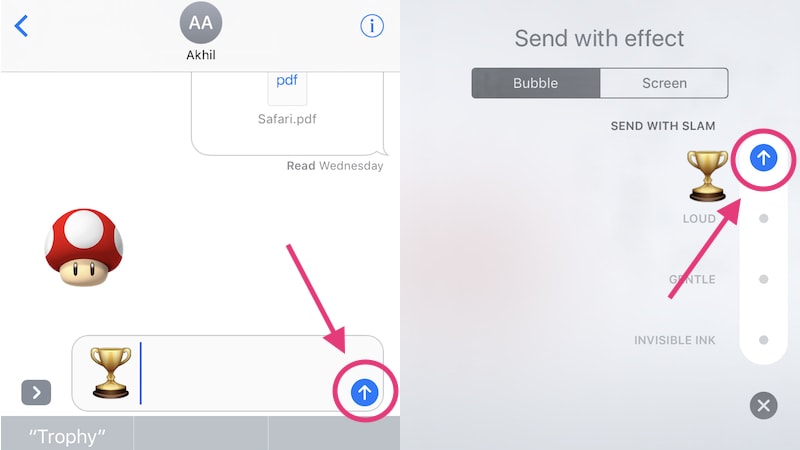
- Open Messages on your iPhone, iPad, or iPod touch – be sure the device is running iOS 10.
- Type your message.
- Tap and hold the blue up-arrow button that you use to send messages.
- This will reveal a list of effects. Tap Bubble, which is at the top.
- Now select the effect you want to use from the list. Slam adds a bit of exaggerated emphasis to the message. Loud increases the font size temporarily, while Gentle reduces it. Invisible Ink hides the message.
- Tap the blue up-arrow button next to the effect to send the message.
How to send screen effects such as fireworks, balloons, lasers on iMessage
Screen effects add full-screen effects to your message. If you want to send messages with confetti appearing in the background or fireworks lighting up the screen, then follow these steps.
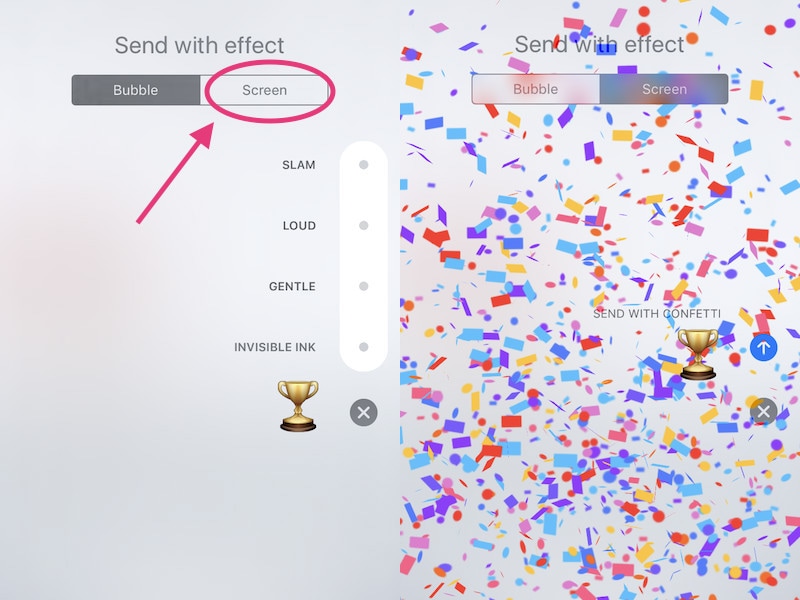
- In the Messages app, type your message, and tap and hold the blue up-arrow button that you use to send messages.
- Tap Screen at the top.
- Now just swipe towards the left to scroll through effects. You can choose from Balloons, Confetti,Lasers, Fireworks, and Shooting Star.
The effect in the background gets sent, so when you’ve picked one, just tap the blue up-arrow buttonto send it.
The Confetti effect automatically triggers if you type “Congrats” and send it.
If you know any other shortcuts to send iMessage effects, let us know via the comments. For more tutorials, visit our How To section.